

Referring a Case to a Specialist (Summary PDF)
What is the Referral Summary?
The Refer This Case feature lets you generate a professional, structured PDF summary of a patient case that you can send directly to a specialist, consultant, or collaborating practitioner.
Instead of writing a referral letter from scratch or copy-pasting notes between systems, PraxPilot compiles the most relevant clinical information into a clean, ready-to-send document in seconds.
Why use it?
Referral coordination in integrative and functional medicine is typically manual, time-consuming, and inconsistent. Practitioners report spending up to an hour preparing context for a specialist referral — pulling notes from multiple places, writing a narrative summary, and formatting it for external use.
The Referral Summary solves this by:
Pulling the clinical context that already exists in the case
Structuring it in a format specialists can read quickly
Removing the need to write a referral letter from scratch
Giving you full control over what to include before sending
When should I use it?
Use the Referral Summary whenever you need to:
Send a patient to a specialist and want to provide clinical context upfront
Collaborate with another practitioner who isn't in your PraxPilot account
Hand off a complex case and ensure continuity of care
Create a documented record of what was communicated at the point of referral
You can generate a referral at any point in the case — before or after finalizing a protocol.
What's included in the PDF?
The referral form lets you review and edit the following fields before generating the PDF:
Field | Description |
|---|---|
Referring Practitioner | Your name and practice details |
Referred To | The specialist or clinic you're referring to (optional) |
Primary Complaint | The patient's main presenting concern |
Key Symptoms | Relevant symptom clusters |
Clinical Notes Summary | A summary of your clinical observations and notes |
Relevant Lab Markers | Key lab values relevant to the referral |
Detected Clinical Patterns | AI-identified patterns from the case |
Protocol Overview | A summary of the current or completed protocol |
Additional Notes | Any other context you want to include (optional) |
Note: Empty optional fields are automatically omitted from the PDF. The specialist only sees what you've filled in.
How to generate a Referral Summary
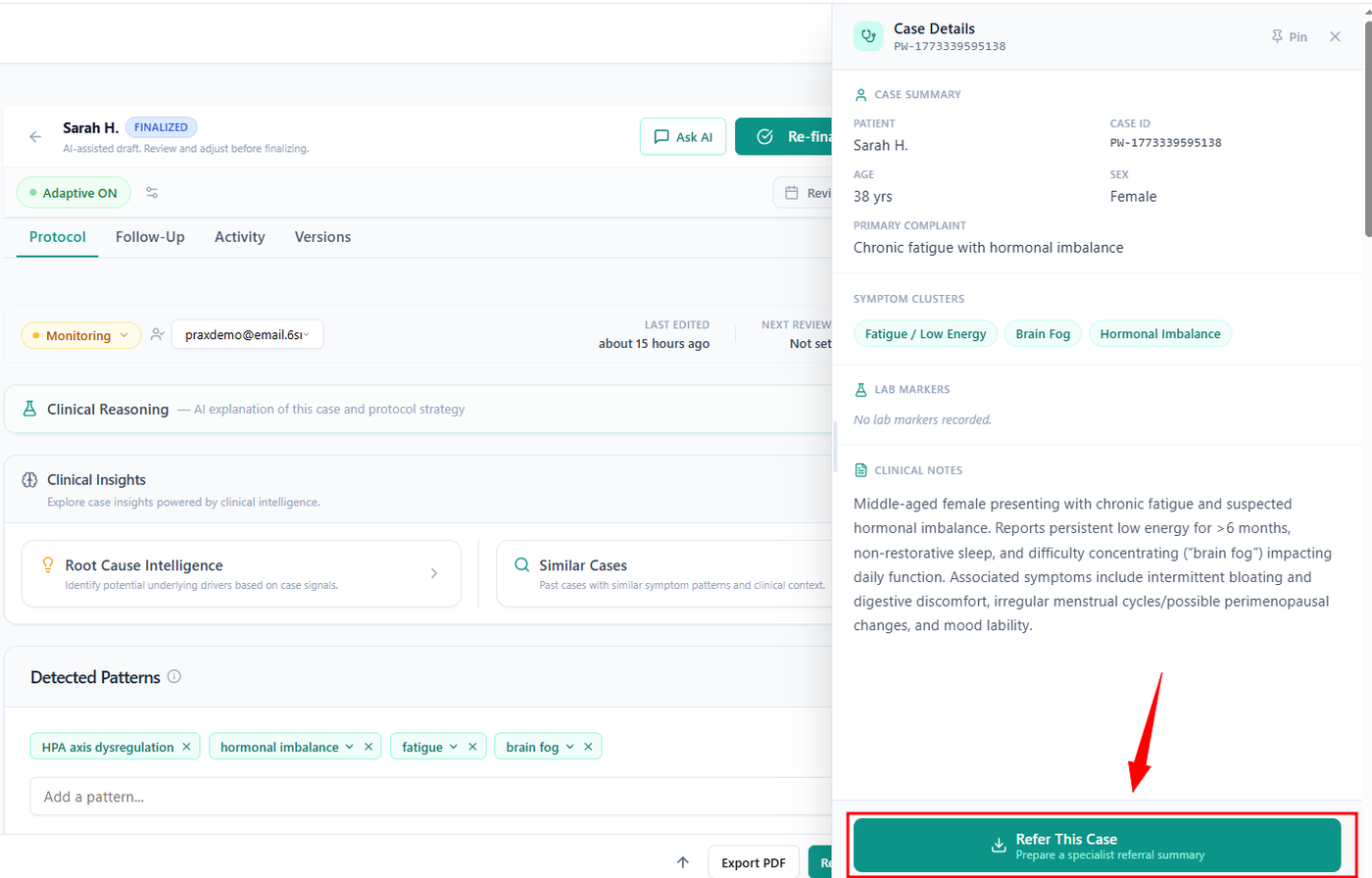
Open the case you want to refer
In the Case Details sidebar, scroll to the bottom and click "Refer This Case"
You'll see the subtitle: "Prepare a specialist referral summary"
A form will open with pre-filled fields pulled from the case
Review and edit each field — the information is editable before export
When you're satisfied, click "Generate PDF"
Download the PDF and send it to the specialist via your preferred method (email, portal, etc.)
FAQ:
Can I edit the information before exporting?
Yes. All fields in the referral form are fully editable before you generate the PDF. PraxPilot pre-fills the fields from existing case data to save you time, but you have complete control over what appears in the final document.
This is intentional — you know your patient and the specialist you're referring to. PraxPilot gives you a structured starting point, not a locked document.
Does the PDF include the patient's name?
PraxPilot uses the Patient Reference you entered when creating the case — which may be initials, a reference code, or a nickname rather than a full name. Whatever appears in the Patient Reference field will appear in the referral PDF.
If you used a pseudonymous identifier (which we recommend), that's what the specialist will see. If you need the specialist to know who the patient is, include that information in the Additional Notes field or communicate it through a separate secure channel.
Is the referral PDF secure?
The PDF is generated and downloaded directly to your device. PraxPilot does not send it on your behalf — you control where it goes. Treat it like any other clinical document and send it through your practice's standard secure communication channel.
Can I use this without a finalized protocol?
Yes. The Referral Summary is available at any stage of the case. If you haven't finalized a protocol yet, the Protocol Overview field may be empty or minimal — you can fill it in manually before generating the PDF.