

How to Edit a Protocol
Every element of a generated protocol can be edited before finalization. PraxPilot is designed so you remain in full control of every clinical decision.
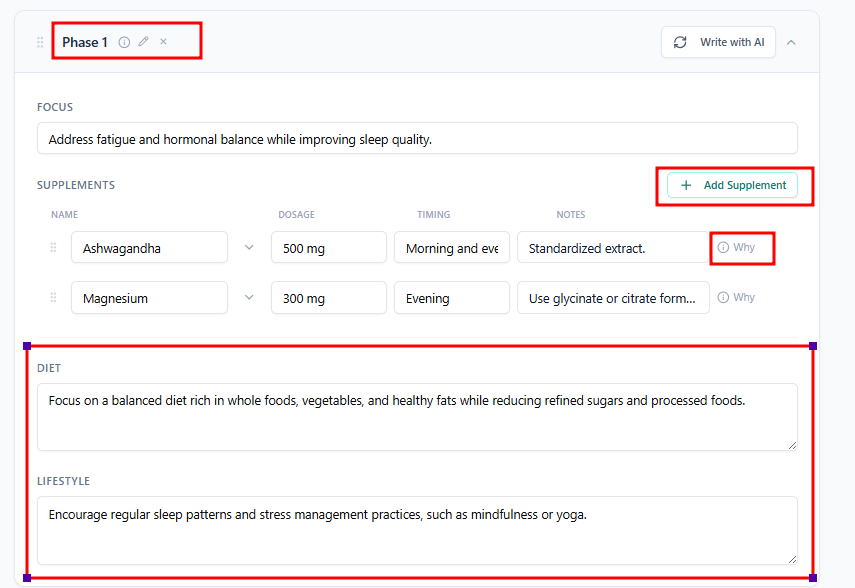
Editing Supplements
Add a supplement: Use the supplement search or auto-suggest to find and add a supplement to any phase.
Remove a supplement: Click the remove icon next to any supplement.
Change a supplement: Remove the existing one and add your preferred alternative.
Edit dosage: Click the dosage field to type your preferred amount and frequency.
Edit timing: Adjust when the supplement should be taken (e.g., with meals, before bed).
Edit rationale: Each supplement includes an auto-generated "why recommended" note. You can edit this to match your preferred language.
Editing Diet Recommendations
Click into the diet section of any phase to edit the text. Add, remove, or rewrite recommendations to match your clinical approach.
Editing Lifestyle Recommendations
The same applies to the lifestyle section — sleep, stress, movement, and other guidance can all be adjusted freely.
Editing Phase Structure
Rename a phase by clicking its title.
Add a new phase using the + Add Phase option.
Delete a phase if it is not needed.
Move supplements between phases by dragging or using the move option.