

Using "Write with AI" to Edit Faster
Instead of manually editing individual fields, you can use the Write with AI feature to update sections of your protocol using spoken or typed natural language instructions.
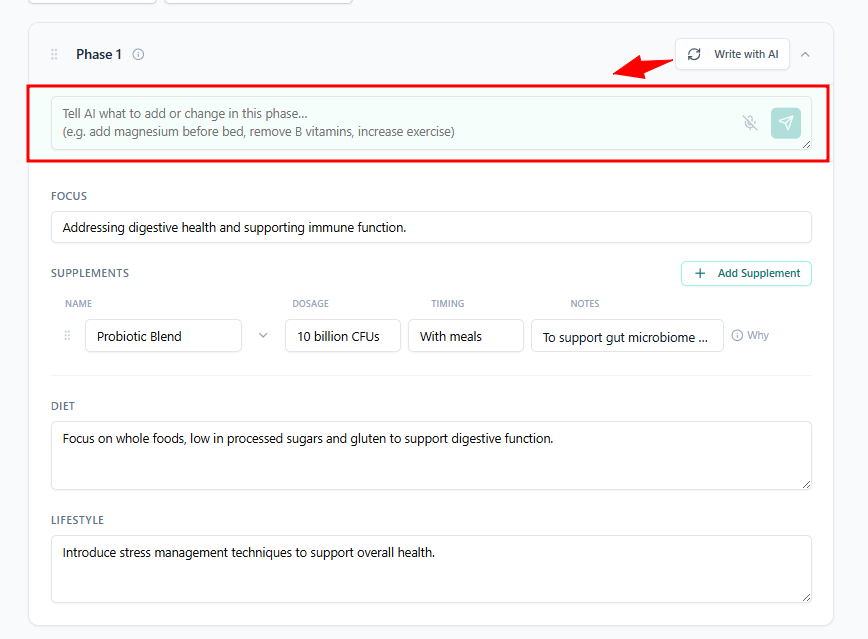
How to Use It
Open the protocol editor.
Click Write with AI (or use the voice input button for spoken instructions).
Type or speak your instruction. For example:
*"Replace magnesium oxide with magnesium glycinate at 400mg at night"
*"Add omega-3 fish oil 2g daily to Phase 1"
*"Remove the adrenal support section from Phase 2"
*"Rewrite the diet section to focus on a low-inflammatory approach"
Review the suggested changes and apply or discard them.
Tips
Be specific — the clearer your instruction, the more accurate the result.
You can use it for supplements, dosing, diet, lifestyle, or rationale text.
For voice input, speak clearly and at a normal pace. It works on both desktop and mobile.