

Tracking Patient Outcomes
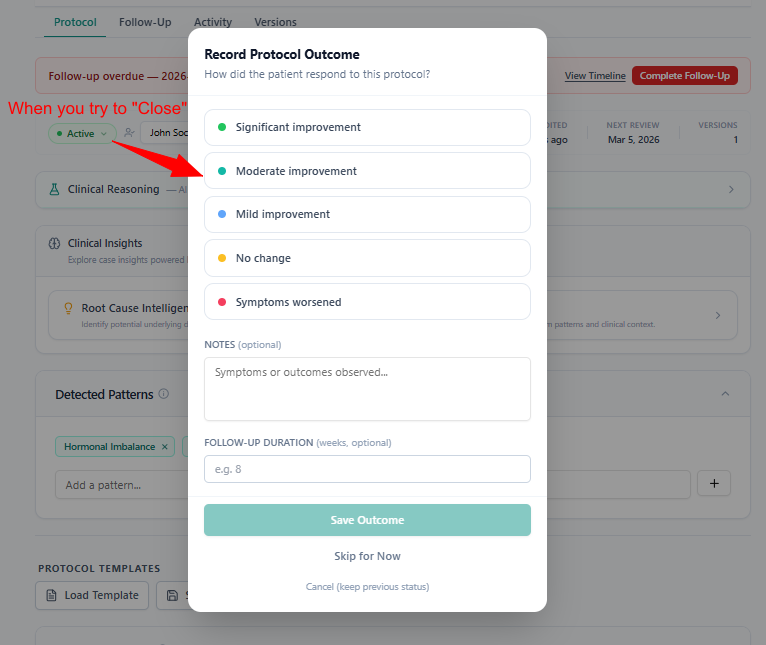
Outcome Tracking helps you record how a patient responds to a protocol over time.
When it appears
When a case is marked as Closed
Or after completing a follow-up
What you can track
Improvement level
Symptom changes
Clinical observations
Why it matters
Outcome tracking helps you:
Measure effectiveness
Improve future protocols
Identify patterns across patients
When Are Outcomes Recorded?
Outcomes are recorded when you complete a follow-up.
During completion, you can select:
Improvement level
Notes about patient progress
Outcome Options
You can choose from:
Improved
No Change
Worsened
(or leave blank if not applicable)
These provide a quick, standardized way to assess progress.
Adding Notes
You can include optional notes such as:
Symptom changes
Patient feedback
Observations
Adjustments made
These notes are saved with the follow-up entry.
Where Outcomes Appear
In Insights
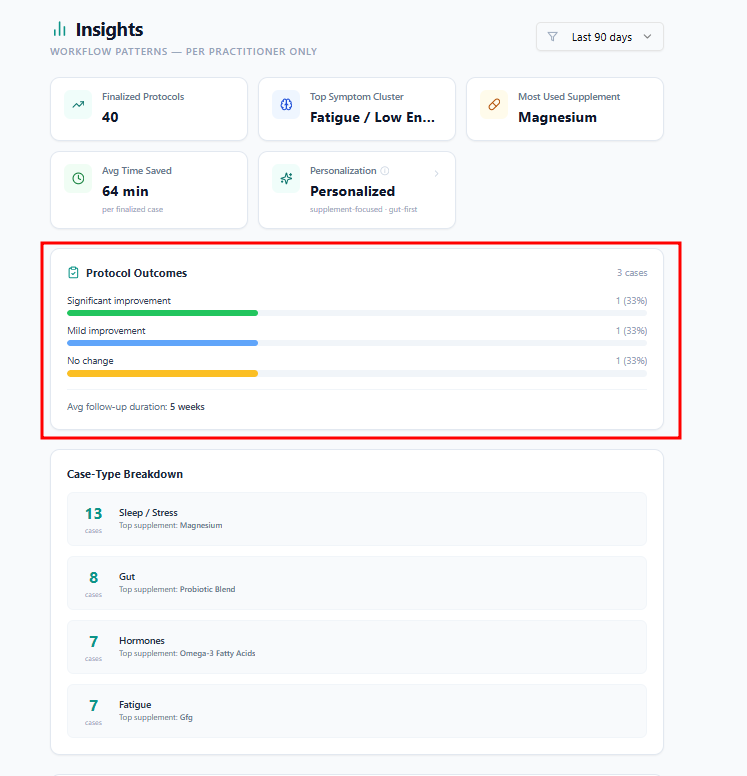
Outcomes contribute to your Insights dashboard, helping you see:
Overall improvement trends
Patterns across cases
Effectiveness of protocols
Why Outcome Tracking Matters
Tracking outcomes helps you:
Make better clinical decisions
Identify what works (and what doesn’t)
Improve consistency in patient care
💡 Best Practice:
For best results:
Record an outcome after every follow-up
Keep notes short but meaningful
Stay consistent with your assessment