

Lab Interpretation — Analyzing Labs in PraxPilot
What is Lab Interpretation?
PraxPilot includes built-in Functional Medicine (FM) lab interpretation — a clinical intelligence layer that reads your uploaded lab reports and goes beyond conventional reference ranges to flag markers that may be suboptimal from a functional medicine perspective.
When you upload a patient's labs, PraxPilot doesn't just extract the numbers. It compares each marker against FM-specific optimal ranges, identifies markers that fall outside those optimal ranges even if they appear "normal" on the lab report, and surfaces clinically relevant insights — all within the case you're already working in.
The key difference: A conventional lab report tells you whether a value is within a population-based reference range. FM interpretation tells you whether a value is within the range associated with optimal function — which is often much narrower.
Why This Matters for Your Practice
Many of your patients have been told their labs are "normal" — yet they present with fatigue, brain fog, hormonal symptoms, or digestive issues that don't resolve. The gap between "not sick" and "functioning optimally" is exactly where functional medicine lives.
Without FM-specific interpretation, reviewing a full panel manually against FM references takes 30–45 minutes per case. You need to:
Cross-reference each marker against FM optimal ranges from memory or a separate reference guide
Identify which suboptimal findings are most relevant to the patient's specific symptoms
Write clinical notes explaining the significance
Factor those insights into your protocol
PraxPilot does all of this automatically, in seconds, the moment labs are uploaded.
When to Use It
Lab interpretation activates automatically whenever labs are uploaded to a case. You don't need to trigger it manually.
It is most valuable when:
Reviewing a new case — FM flags are visible immediately alongside the lab panel, before you write a single line of protocol
Working with patients whose labs appear conventionally normal — suboptimal markers are surfaced that might otherwise be missed
Cases with multiple symptom clusters — the system connects specific markers to the patient's reported symptoms, so you can see at a glance which labs are most clinically relevant to their presentation
Interpreting specialist labs — GI MAP, DUTCH hormone panels, and Organic Acids Tests (OAT) are all supported with panel-specific FM reference data
Where to Find It
Lab interpretation is built directly into the Case Details sidebar — there is no separate tool to open, no separate login, no extra step.
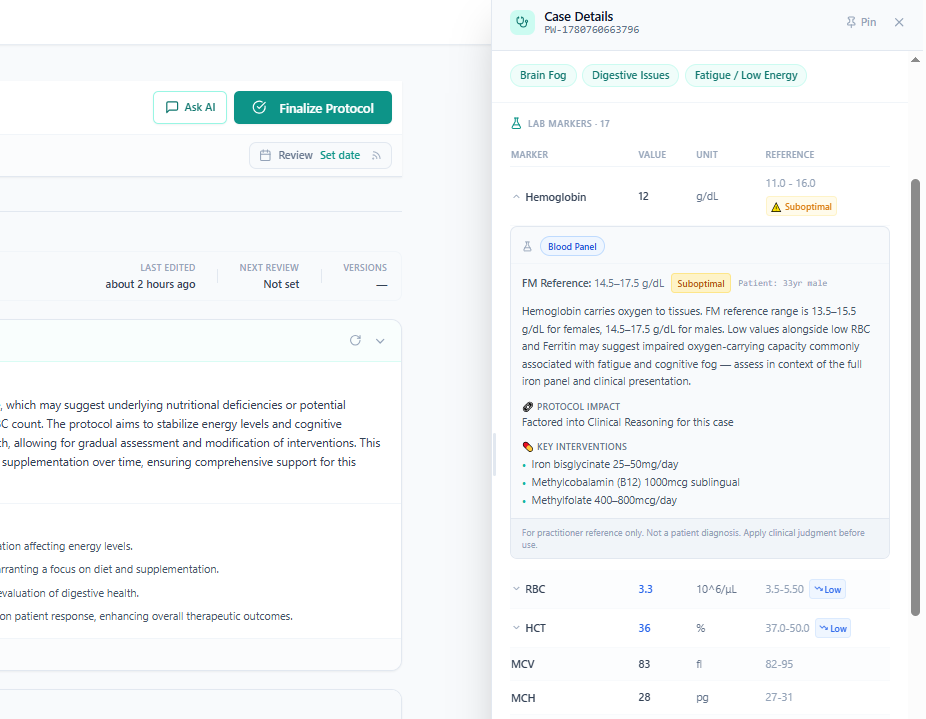
Open any case
Look at the right-hand Case Details panel
Scroll to the Lab Markers section
Any marker with FM data will show a badge and a ▾ chevron on the right side of its row
Click any flagged row to expand the full FM interpretation
How It Works
Step 1 — Upload the lab report
Upload any lab PDF or image to the case as you normally would. PraxPilot extracts all markers automatically, including the patient's values, units, and the lab's own conventional reference ranges.
Supported formats include:
Standard blood panels (CBC, metabolic panel, lipid panel, thyroid, hormones, nutrients)
GI MAP stool analysis
DUTCH hormone panels
OAT (Organic Acids Test)
Labs in multiple languages (English, German, Spanish, French, Dutch, Italian, Greek)
Labs using European units (mmol/L, nmol/L) — automatically converted
Step 2 — Read the FM badges
Each marker in the Lab Markers panel displays one of the following:
Badge | Meaning |
|---|---|
🔴 Low | Value is below the lab's conventional reference range |
🔴 High | Value is above the lab's conventional reference range |
⚠ Suboptimal | Value is within the lab's "normal" range but outside the FM optimal range |
🔴 Detected | GI MAP pathogen detected (qualitative positive) |
🟡 Absent | GI MAP beneficial commensal is absent or low |
Markers with no badge are within both the conventional and FM optimal ranges.
Important: The ⚠ Suboptimal badge is what makes FM interpretation uniquely valuable. It identifies the clinical grey zone — values a conventional doctor would not act on, but which may be meaningful in the context of your patient's symptoms and functional health goals.
Step 3 — Expand any marker for full interpretation
Click any row with a ▾ chevron to open the detailed FM interpretation panel. For each marker you will see:
Lab Reference (conventional) — the range printed on the original lab report
FM Reference Range — the functional medicine optimal range for this marker
Patient context — the patient's age and sex, confirming which sex-specific or age-appropriate range is being applied
FM Status — whether the marker is Suboptimal, Low, High, Optimal, or Detected
🎯 Relevant to — which of the patient's symptom clusters this marker is clinically connected to (e.g. Relevant to: Fatigue / Low Energy, Brain Fog)
Clinical summary — a plain-language explanation of what this marker measures and why its FM value matters for this patient
Protocol Impact — confirmation that this finding has been factored into the AI-generated clinical reasoning and first draft protocol
Key Interventions — evidence-informed supplement and lifestyle suggestions associated with this marker
All content in the interpretation panel is for practitioner reference only. It is not a patient diagnosis. Always apply your clinical judgment before acting on any suggestion.
Step 4 — See it in Clinical Reasoning and your protocol
You don't need to manually carry lab findings into your protocol. FM-flagged markers are automatically injected into:
Clinical Reasoning — the AI summary already references the most clinically significant FM findings in the context of the patient's symptoms
First Draft Protocol — the generated protocol reflects the FM lab insights alongside all other case data
Chat with Case — when you ask the AI questions about the case, it already knows which labs are flagged and why. Ask questions like "What's driving this patient's fatigue based on her labs?" and get a contextually relevant answer
Supported Lab Types
Blood & Hormone Panels
Includes 50+ markers: full CBC, thyroid (TSH, Free T3, Free T4), sex hormones (Estradiol, Progesterone, Testosterone, DHEA-S, LH, FSH), metabolic markers (Glucose, Insulin, HbA1c), nutrients (Vitamin D, B12, Folate, Magnesium, Ferritin, Zinc, Selenium), cardiovascular (hsCRP, Homocysteine, Cholesterol fractions), and liver function.
GI MAP (Stool Analysis)
Full GI MAP interpretation including pathogens (H. pylori, Candida, E. coli strains, parasites), beneficial commensals (Faecalibacterium prausnitzii, Akkermansia muciniphila, Lactobacillus, Bifidobacterium), and functional markers (Secretory IgA, Elastase-1, Anti-gliadin IgA, Calprotectin, β-Glucuronidase).
DUTCH (Hormone Panel)
Cycle-phase-aware interpretation for female patients (follicular, luteal, postmenopausal). Includes estrogen metabolites (2-OH, 4-OH, 16-OH, 2:16 ratio), progesterone metabolites, testosterone metabolites, cortisol rhythm (AM/PM), DHEA-S, and melatonin.
OAT (Organic Acids Test)
Interpretation of yeast and bacterial metabolites (Arabinose, HPHPA, 4-Cresol), Clostridia markers, Krebs cycle intermediates, neurotransmitter metabolites (5-HIAA, HVA, VMA, Quinolinic Acid), and nutritional markers.
How It Actually Helps Practitioners:
1 — Saves 20–40 minutes per case
A practitioner reviewing a full panel (18+ markers) manually against FM references, cross-checking which are suboptimal, writing clinical notes — that's 30–45 minutes of work. This makes it instant.
2 — Catches what conventional ranges miss
Hemoglobin 12 in a 44-year-old female with fatigue passes every lab's "normal" test. PraxPilot flags it as Suboptimal. That's the core clinical use case — finding the grey zone that conventional medicine ignores. This is why FM practitioners chose their specialty.
3 — Symptom-to-lab connection is automatic
The practitioner selects "Fatigue / Low Energy" and "Brain Fog" at intake. The lab panel now shows which markers are directly relevant to those symptoms. They don't have to hold the clinical map in their head and manually cross-reference — the tool does it.
4 — Lab findings flow directly into the protocol
LabDx tells you what a marker means. PraxPilot takes that meaning and feeds it into Clinical Reasoning, the first draft protocol, and Chat with Case. The insight doesn't stop at interpretation — it becomes action. That's the biggest differentiation.
5 — Practitioners can talk to the case
"What's driving this patient's fatigue based on her labs?" — Chat with Case now knows about the FM-flagged markers, the symptom clusters, the patient's age and sex. The AI can synthesise across all of it in a conversational way. LabDx has no equivalent.
6 — Works with European labs and non-English reports
UK, German, Spanish, Greek practitioners can upload their local lab reports and get FM interpretation without manually converting units or translating marker names. LabDx doesn't do this.
"I used to spend half an hour reviewing labs before I could even start writing a protocol. Now I open the case, the flags are already there, the clinical reasoning already incorporates them, and I just review and finalise. It's like having a very well-trained FM associate doing the prep work."
- Philip K. (FM Practitioner)
That's the real value. Not just interpretation — interpretation that feeds the workflow.
Frequently Asked Questions
Does this replace my clinical judgment?
No. PraxPilot surfaces FM reference data and clinical context to support your decision-making. All interpretations are marked as practitioner reference only and require your review before any clinical action.
What if the lab report is in German or Spanish?
PraxPilot supports multilingual lab reports. Marker names are automatically translated to their English canonical form for FM matching. Units are also automatically converted (e.g. Vitamin D in nmol/L is converted to ng/mL for comparison).
What if the lab doesn't print reference ranges on the report?
The conventional reference range line in the expanded panel will simply not appear — only the FM Reference Range is shown. This does not affect the FM interpretation.
What if my patient's lab has a marker not in the FM database?
Markers with no FM data appear in the lab panel as normal rows with no badge and no chevron. They are still visible and documented in the case.
Does the lab interpretation change the Clinical Reasoning AI?
Yes. FM-flagged markers are automatically included in the context provided to Clinical Reasoning, the protocol draft, and Chat with Case. You don't need to copy anything manually.
Are the FM reference ranges based on published research?
The FM reference ranges in PraxPilot are based on ranges commonly used in functional and integrative medicine practice. They are intended as a clinical reference framework. Always apply your own clinical training and consult current literature when making treatment decisions.
Ready to try it? Open any case with uploaded labs, scroll to Lab Markers in the Case Details panel, and click any marker with a ▾ chevron to see its full FM interpretation.