

Chatting with Case (AI Clinical Assistant)
What is “Chat with Case”?
Chat with Case is an AI-powered assistant built directly into each patient case in PraxPilot.
It lets you ask questions in plain English and get answers that are grounded in the specific context of the case you’re viewing—labs, notes, symptoms, history, medications mentioned, and more.
Think of it like a fast, highly organized clinical colleague: it helps you pull signal from the noise without digging through the file manually.

Why you’ll use it (the real benefit)
Most protocol time isn’t spent “thinking clinically.”
It’s spent on:
re-reading notes
scanning labs
recalling what matters most
rewriting the same explanations
checking contraindications and interactions
making sure nothing important is missed
Chat with Case compresses that busywork into a question.
So you can move faster without cutting corners.
What it can do (use cases)
1) Rapid case retrieval (find what matters instantly)
Instead of hunting through the chart, you can ask:
“What are the top 5 abnormal labs and what might they suggest?”
“What symptoms have been most consistent across visits?”
“What medications or diagnoses are mentioned in the notes?”
“Summarize this case in 10 bullets for a follow-up visit.”
Outcome: faster prep, faster follow-ups, less context switching.
2) Clinical reasoning support (explore options quickly)
You can use it to pressure-test your thinking:
“What are the most likely root-cause buckets to consider based on this case?”
“What would you prioritize first: gut, hormones, detox, or nervous system? Why?”
“What questions should I ask next to clarify the picture?”
Outcome: better decision clarity, fewer missed angles, more confident sequencing.
3) Evidence-based suggestions (with references)
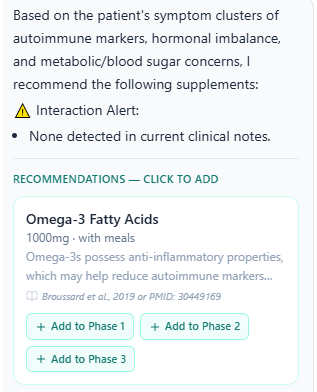
When it suggests supplements, approaches, or considerations, it’s designed to include supporting references like:
(Ref: [Author et al., Year])
(Ref: [PMID: XXXXXXX])
Outcome: you don’t just get “ideas”—you get traceable reasoning you can verify.
Note: citations are there to support clinical review, not to replace it.
4) Safety & interaction awareness (built into the flow)
Chat with Case scans the case notes for medications / conditions and can flag potential issues before you act.
If it detects a potential conflict, it will show a clear warning like:
⚠️ Interaction Alert
Ginkgo Biloba + Warfarin: Potential increased risk of bleeding. Practitioner review advised.
Outcome: safer recommendations and fewer “oops” moments when moving fast.
When to use Chat with Case (best moments)
Use it when you want speed and accuracy:
Before a first consult: “Give me a clinician-ready summary and key risk flags.”
Before building a protocol: “What would you prioritize first and why?”
During protocol building: “Suggest options for X symptom with evidence + dosage ranges.”
At follow-up: “What changed since last visit? What trends are improving/worsening?”
When you feel stuck: “What are 3 plausible explanations that fit these labs + symptoms?”
When you want to sanity-check safety: “Any concerns with these supplements given the meds?”
How it works (simple explanation)
When you open the Chat with Case panel and send a message, the AI processes your question along with the patient case context available in PraxPilot (e.g., demographics, primary complaint, symptom clusters, clinical notes, labs, medications mentioned).
Then it generates a response based on:
the case context, and
its clinical knowledge base (with references when making clinical suggestions)
In addition, you can add recommended supplements to your protocol with one click.
Trust, safety, and responsibility (important)
Chat with Case is designed to be helpful in real clinical workflows—but it has clear boundaries:
Clinical assistant (not a diagnostic tool)
It does not diagnose
It does not prescribe medications
It does not override clinical judgment
You stay in control
You (the practitioner) are responsible for:
verifying suggestions
interpreting relevance to your patient
making all care decisions
Usage limits
Each message you send in Chat with Case counts toward your organization’s monthly AI generation limit, shared with other AI generation features (including protocol generations).
Example questions (copy/paste library)
Case summary & prep
“Summarize this patient’s case in 10 bullets.”
“What are the top 3 priorities for this case and why?”
“List red flags or contraindications based on what’s in this case.”
Labs & patterns
“What are the most significant abnormal labs and what do they suggest?”
“Are there patterns consistent with inflammation / insulin resistance / dysbiosis?”
“What labs should I consider ordering next to confirm the likely root cause?”
Protocol building
“Give 3 evidence-based supplement options for fatigue in this context (include dosing considerations + citations).”
“Suggest a phased protocol outline (Phase 1, 2, 3) based on this case.”
“What dietary approach would best match this symptom/lab picture and why?”
Safety checks
“Any supplement interactions to watch for based on meds/conditions mentioned?”
“Given warfarin is mentioned in the notes, what should I avoid and what alternatives exist?”
“Flag anything in this case that increases risk with common supplements.”
Patient communication support (if you want wording)
“Explain the likely root cause hypothesis in patient-friendly language.”
“Write a short rationale for why we’re starting with Phase 1 first.”
Bottom line
Chat with Case helps you move through complex cases faster by turning the entire case file into something you can query instantly—with guardrails for evidence and safety—while keeping clinical decision-making where it belongs: with you.
If you want, paste a screenshot of the UI or tell me exactly where the feature lives in the case view (button label, panel name, etc.), and I’ll tailor this article so it matches the in-app steps perfectly (and reads like a polished production helpdesk doc).